- Thread Author
- #1
Day1:
Terraform is an open-source Infrastructure as Code (IaC) tool developed by HashiCorp. It allows users to define, provision, and manage infrastructure using a high-level configuration language called HashiCorp Configuration Language (HCL) or JSON.
Press enter or click to view image in full size
With Terraform, you can automate infrastructure deployment across multiple cloud providers like AWS, Azure, and Google Cloud, as well as on-premises environments.
Terraform follows a declarative approach, meaning users define the desired state of the infrastructure, and Terraform takes care of creating and maintaining it. This simplifies infrastructure management and reduces manual errors.
Infrastructure as Code (IaC) brings automation and efficiency to managing IT infrastructure.
Here are some key benefits:
Several Infrastructure as Code tools exist, but Terraform stands out for its unique approach. Let’s compare Terraform with some popular alternatives:
Press enter or click to view image in full size
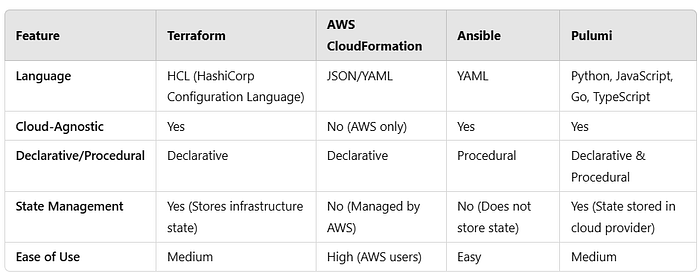
Terraform’s cloud-agnostic nature and strong state management make it a preferred choice for multi-cloud environments.
Installing Terraform is straightforward. Follow these steps based on your operating system:
Whether you’re working on AWS, Azure, or Google Cloud, Terraform can help automate deployments and streamline infrastructure operations.
brew install hashicorp/tap/terraform
2. Verify installation: terraform — version
wget -O- https://apt.releases.hashicorp.com/gpg | gpg — dearmor | sudo tee /usr/share/keyrings/hashicorp-archive-keyring.gpg
2. Add Terraform’s repository and install:
echo “deb [signed-by=/usr/share/keyrings/hashicorp-archive-keyring.gpg] https://apt.releases.hashicorp.com $(lsb_release -cs) main” | sudo tee /etc/apt/sources.list.d/hashicorp.list
sudo apt-get update && sudo apt-get install terraform
3. Verify installation: terraform — version
Terraform is an open-source Infrastructure as Code (IaC) tool developed by HashiCorp. It allows users to define, provision, and manage infrastructure using a high-level configuration language called HashiCorp Configuration Language (HCL) or JSON.
Press enter or click to view image in full size
With Terraform, you can automate infrastructure deployment across multiple cloud providers like AWS, Azure, and Google Cloud, as well as on-premises environments.
Terraform follows a declarative approach, meaning users define the desired state of the infrastructure, and Terraform takes care of creating and maintaining it. This simplifies infrastructure management and reduces manual errors.
 Benefits of Infrastructure as Code (IaC)
Infrastructure as Code (IaC) brings automation and efficiency to managing IT infrastructure.Here are some key benefits:
- Consistency & Reliability: Ensures that infrastructure is deployed in a consistent and repeatable manner, reducing configuration drift.
- Scalability: Automates resource provisioning, making it easy to scale up or down as needed.
- Version Control: Terraform configurations can be stored in Git or other version control systems, allowing tracking and rollback of changes.
- Cost Optimization: Eliminates manual intervention, reducing operational overhead and human errors.
- Collaboration & Documentation: Code-based infrastructure facilitates collaboration among teams and serves as documentation for system configurations.
Terraform vs. Other IaC Tools
Several Infrastructure as Code tools exist, but Terraform stands out for its unique approach. Let’s compare Terraform with some popular alternatives:Press enter or click to view image in full size
Terraform’s cloud-agnostic nature and strong state management make it a preferred choice for multi-cloud environments.
How to Install Terraform
Installing Terraform is straightforward. Follow these steps based on your operating system:1. Install on Windows:
- Download Terraform from Terraform’s official website.
- Extract the downloaded ZIP file.
- Move the extracted terraform.exe to a folder included in your system’s PATH (e.g., C:\terraform).
- Verify installation by running: terraform — version
Whether you’re working on AWS, Azure, or Google Cloud, Terraform can help automate deployments and streamline infrastructure operations.
2. Install on macOS (Using Homebrew):
- Open Terminal and run:
brew install hashicorp/tap/terraform
2. Verify installation: terraform — version
3. Install on Linux (Using apt for Ubuntu/Debian):
- Add HashiCorp repository:
wget -O- https://apt.releases.hashicorp.com/gpg | gpg — dearmor | sudo tee /usr/share/keyrings/hashicorp-archive-keyring.gpg
2. Add Terraform’s repository and install:
echo “deb [signed-by=/usr/share/keyrings/hashicorp-archive-keyring.gpg] https://apt.releases.hashicorp.com $(lsb_release -cs) main” | sudo tee /etc/apt/sources.list.d/hashicorp.list
sudo apt-get update && sudo apt-get install terraform
3. Verify installation: terraform — version